Final Report

This is my final post for this project! I have had an enjoyable journey drawing this artwork, but I am glad to be completed. I used a small amount of tools during the creation of this artwork. Those tools are the Pen Tool, which allows you to draw the shapes or add and delete anchor points. The select tool, which is very helpful when you need to size up or down a shape. Direct Selection Tool, this tool helps you create the curves in your shapes with anchor points. The Eyedropper Tool assisted me in keeping the colours consistent across the artwork. The Hand Tool was very useful and allowed me to move around the page by clicking and dragging. Finally, the most useful tool was the Zoom Tool. It was incredibly easy to access as the shortcut is the letter z. It was also good to be able to zoom out with just a simple click and drag so I could so my progress. Something that challenged me over this project was my change in vision. Sometimes artists can see a picture in their ind and then start their artwork. However I had a million pictures in my mind. Every time I would finish a session, promising myself that next time I would do this or do that, I ended up thinking of doing something else! The way I overcame this was just accepting that my vision was going to change. I suspect that it would be the same for other artists as well. Sometimes you don’t just have one idea, you have many, but if you combine them it can turn out better than your original idea. I think the most successful part of my artwork is how the shapes turned out. I was worried that if I did these shapes the viewer would believe they are too much, or unnecessary. However, I believe they turned out very well and instead of being too much, they were just right. They make Billie Holiday pop from the background. This was a very inspiring and joyful project, I look forward to doing more like it.
Progress Report #3
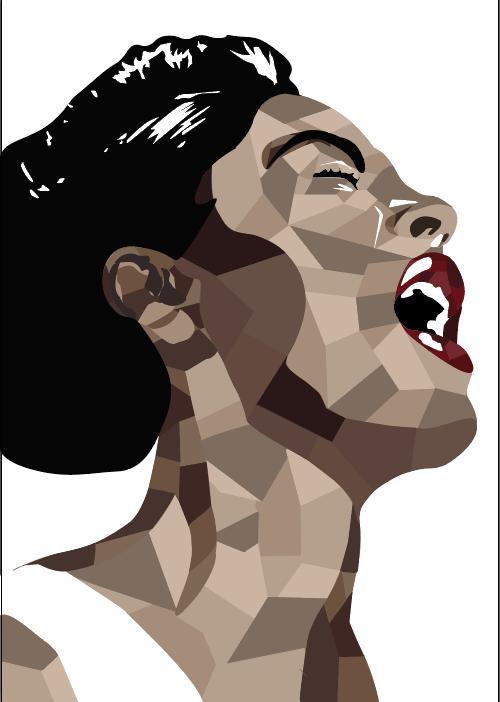
My work has progressed really well! Since my last progress report, I have made a big change. I have divided the separate tones into shapes and shades. This was a pretty simple task, it just takes a bit of time. It took me two sessions to successfully achieve this. The only difficulty I faced was when using the pen tool to make a new shape, sometimes I would accidentally delete one of the anchor points for the other shapes. This would be quite annoying and I would have to take back the steps so I could fix this problem. I like that at this stage in the artwork it is more complex looking than the last progress report, but not so complex that it hurts your eyes. Next, I will add a background. I will use the ideas from my last progress report and try them out. My next post will be my finished artwork.
Progress Report #2

This is my second progress report! I am happy to say I have smoothed out the sections and I’m proud of how it looks. The main difficulty in progressing from the last point to this one was definitely having to add and delete anchor points to curve the lines. It was a painful process as while I was roughly sectioning of the parts I may have put one or twenty too many anchor points and in some sections barely any in other sections. Something I dislike about my artwork is how plain it looks. The colours are solid and uninteresting. However, I do admire the simplicity. This makes the lips and the white highlights glow. What I have to do next is pick a background. I have a few ideas. I could do a mirror effect and replicate the artwork and lower the opacity so it looks like she is fading out of the picture. Or I could find one of her albums and use the cover’s background. I will update my decision in the next progress report.
Progress Report #1
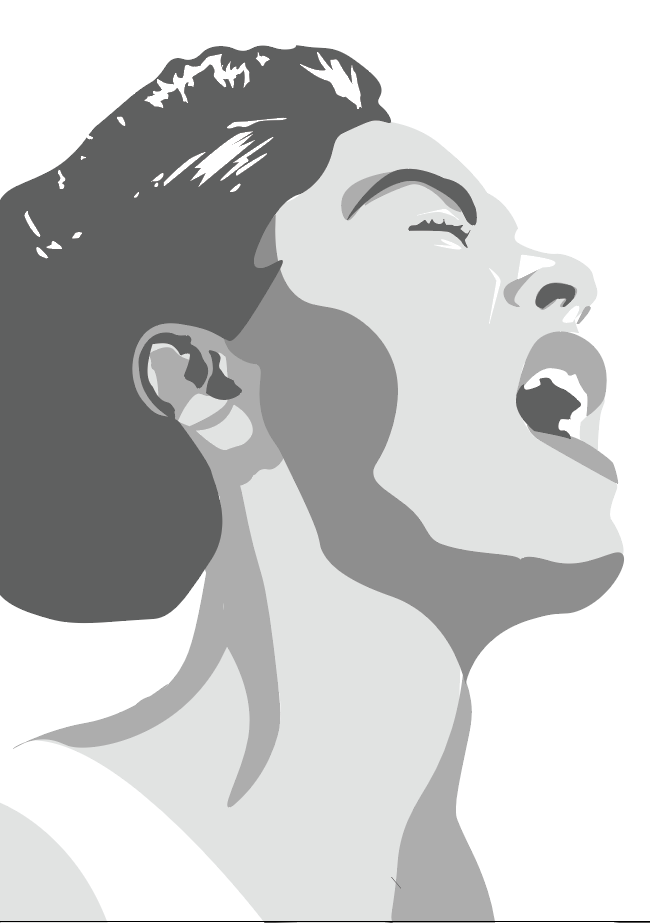
For my Illustrator Portrait, I chose to do Billie Holiday (Eleanora Fagan). Illustrator is an Adobe application that allows you to create vector art. I chose Billie Holiday because of her incredible influence over jazz and blues music.
My progress is going good so far. I have had two hours to work on this project and I’ve successfully roughly sectioned off my tones. The difficult component in creating the artwork is definitely the fact that I am not completely familiar with the Illustrator program yet. Lucky for me, I have my Digital art teacher and the world wide web to help me. Some difficulties I faced when not knowing how to operate the program entirely was making my edges soft. As you can see I’ve ‘roughly’ sectioned the tones off when in actual reality, that’s the smoothest I could get it. Hopefully, by my next progress report, I have been able to fix that problem.
Aspects of my artwork that I like include the mouth region, for some reason, I admire how the teeth turned out. I also like how I have done the highlights around the eyes to accentuate them. Something I dislike about the artwork is the ear. I haven’t been able to successfully section the tones in that area, it’s still a working progress. My vision is to see the sections smoother and in colour, (using a natural skin tone palette). I also want the lips to stand out, so I plan on making them an alternative colour to complement the browns, I’m thinking rose-red.
 tess' artsy blog